¶ General Description
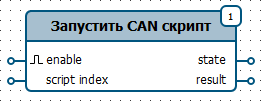
Run one of the CAN scripts saved on the device and receive the execution result.
For the function to operate, the following settings must be configured in the device configuration:
Configuration➜CAN Bus➜Connect CANx bus➜Scripts
¶ Graphical Representation
| In the function menu | On the diagram |
|---|---|
 |
 |
¶ Inputs
| Name | Value type | Description |
|---|---|---|
enable |
bool |
Rising edge - start the script Falling edge - stop the script |
script index |
int32 |
Script number starting from zero |
¶ Outputs
| Name | Value type | Description |
|---|---|---|
state |
int32 |
Receiver state: 0 — inactive 1 — completed 2 — accepted for execution 3 — executing -1 — another error occurred during execution -2 — another script is running -3 — specified script is missing -4 — unknown script format |
result |
int32 |
Execution result. For state equal to -1: -1 — invalid script -2 — script is not supported -3 — error sending data -4 — data not received -5 — unable to receive data |
¶ Status Transitions
0 -> 2 -> 3 -> 1 // final status in case of success
¶ Settings
None
¶ Examples
¶ Example 1
If a constant with the value True is connected to the generate input, the function will be triggered each time it is called.
