¶ Why Logs Are Needed
After learning the structure of a CAN frame, we know that a parameter is not available as a ready-to-use value. Instead, it is embedded within the stream of CAN messages. To locate and decode a parameter, the first step is to record that message stream as a CAN log.
A log records the sequence of CAN messages over time, including the message ID, DATA field, and timestamp. The timeline is essential because it allows changes in the raw bytes to be correlated with actual actions performed on the vehicle.
Before recording logs and performing further analysis, it is recommended to read the CAN Spy User Guide.
¶ Connecting to the CAN Bus
Before recording a log, connect to the correct CAN bus and verify that messages are being received properly.
The connection is made using the CAN_H and CAN_L lines. Possible connection points include the diagnostic connector, the vehicle wiring harness, or any other accessible location on the required CAN bus.
Most vehicles contain multiple independent CAN buses. One bus may carry engine data, while another handles body electronics, the instrument cluster, or auxiliary systems. Therefore, if the expected parameter is missing from the log, the reason may simply be that you are connected to the wrong CAN bus.
After connecting, configure the correct Baudrate. If the baud rate is incorrect, CAN messages will either not be received or will be decoded incorrectly.
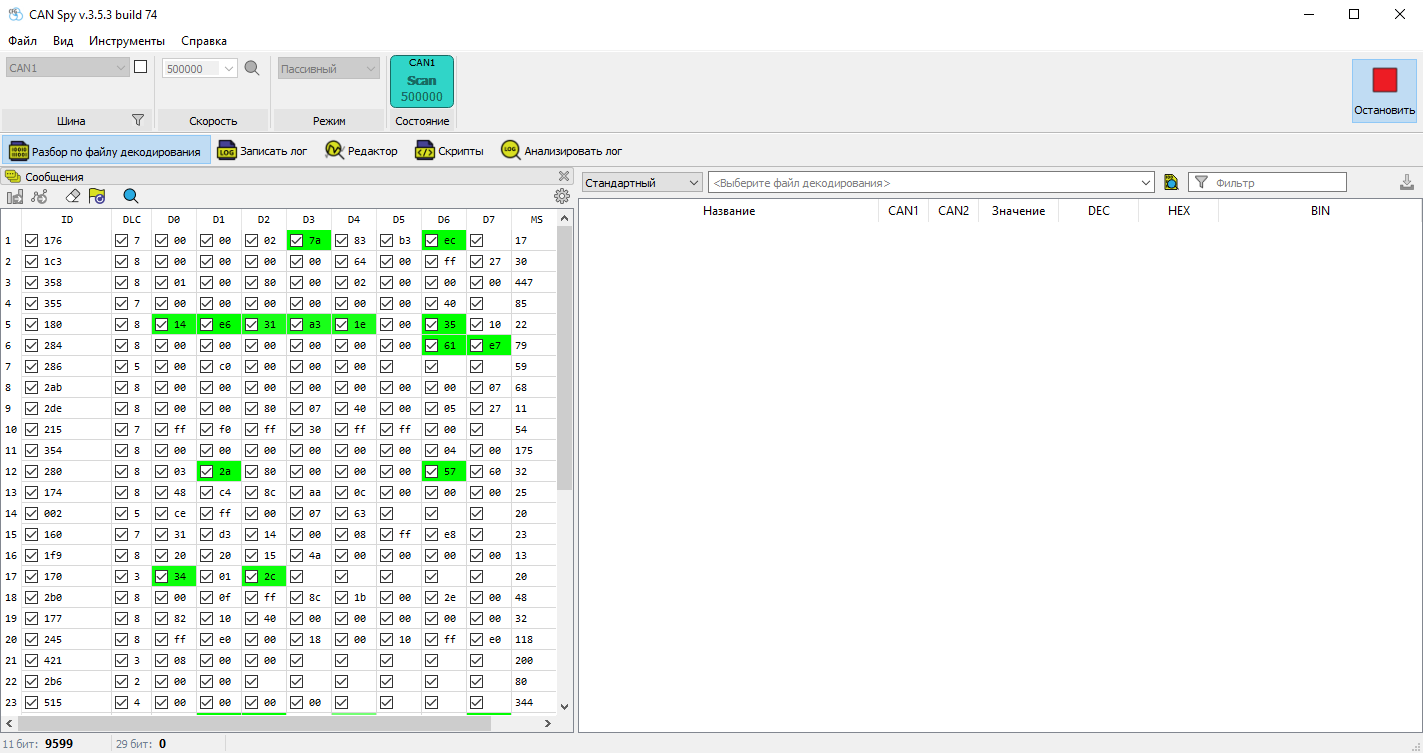
Before recording a log, verify that CAN message IDs appear in CAN Spy and that the DATA bytes are updating. At this stage, the message contents do not need to be analyzed. The goal is simply to confirm that the connection is working and CAN traffic is present.
¶ Where Can You Find CAN Connection Points?
CAN connection points are typically documented in installation manuals for vehicle security systems and telematics devices.
¶ Recording CAN Logs
A CAN log is a time-based recording of CAN traffic. Each message contains an identifier, a DATA field, and a timestamp.
Logs should be recorded in a way that makes it easy to determine exactly when events occurred during vehicle operation. This requires controlling the recording conditions and documenting the actions performed during the recording.
A log recorded without considering vehicle events is simply a sequence of messages without useful reference points, making subsequent analysis much more difficult. The recording process should therefore be organized so that vehicle actions can be correlated with the log timeline.
The table below summarizes recommended recording practices and common mistakes that make analysis more difficult.
| Recommended | Not Recommended | Explanation |
|---|---|---|
| Record a separate log for each sensor. | Activate multiple sensors while recording one long log. | Long logs are much harder to analyze because different sensors change at different times. Recording several short logs makes it much easier to analyze each parameter independently. |
| Record a video while capturing the log. Use the "Custom Discrete/Analog Sensor" template. |
Add only text comments such as: 10 s ON, 16–17 s OFF, ~29 s ON again. (Acceptable only for static parameters that do not change during recording.) |
Text descriptions provide only approximate timing. Since many CAN messages are transmitted every second, it becomes difficult to determine which message corresponds to the observed event. |
| Start recording the video before starting the CAN log. The video should clearly show when log recording begins and every action performed on the vehicle. | Start recording the CAN log before recording the video. or Do not show the beginning of the log recording. |
Without a common starting point, accurate synchronization between the log and the video becomes difficult. |
¶ Initial Log Review
Reviewing a log provides a quick overview of the message traffic and data structure. Verify that CAN communication was active during recording and that the log was captured successfully.
Play back the log in CAN Spy and confirm that the message traffic matches what was observed during recording.
¶ Practical Exercise
Connect to a vehicle CAN bus, determine the correct Baudrate, and verify that CAN messages are being received.
Record the following logs:
- Background log (Ignition ON)
- Background log (Engine Running)
- Custom Discrete Sensor
During the last recording, activate any discrete sensor, for example:
- Door
- Seat belt
- Headlights
Play back the recorded logs using the Log player.
Compare the Engine Running log with the Ignition ON log. Which messages are present only while the engine is running?
Next, compare the Custom Discrete Sensor log with one of the background logs. Can you identify any messages that appear to correspond to the sensor you activated?
¶ Summary
Once a log has been recorded and verified, it becomes the source data for CAN decoding.
The next stage is no longer about examining individual bytes, but about identifying patterns: which values change, when they change, and whether those changes correspond to the behavior of the actual vehicle parameter.
This process is covered in detail in the next module: Finding and Decoding CAN Bus Parameters.
 Back to Contents
 Finding and Decoding CAN Bus Parameters