¶ General
This article explains how to prevent device time from being manipulated by GNSS spoofing and electronic warfare (EW) systems.
The information below does not apply to:
S-21xx,S-23xx,S-25xx
Time synchronization via NTP is only available when the device has an active Internet connection.
¶ Configuration
¶ 1. Check the Device Firmware
The device firmware must be newer than 28.05.2024.
To check the firmware version, send the following command: *?V (How to send a command?)
If necessary, update the device firmware: Firmware version history
¶ 2. Configure the Device
The configuration consists of the following steps:
- Disable time synchronization via GNSS.
- Configure valid NTP servers.
- Reduce the NTP synchronization interval.
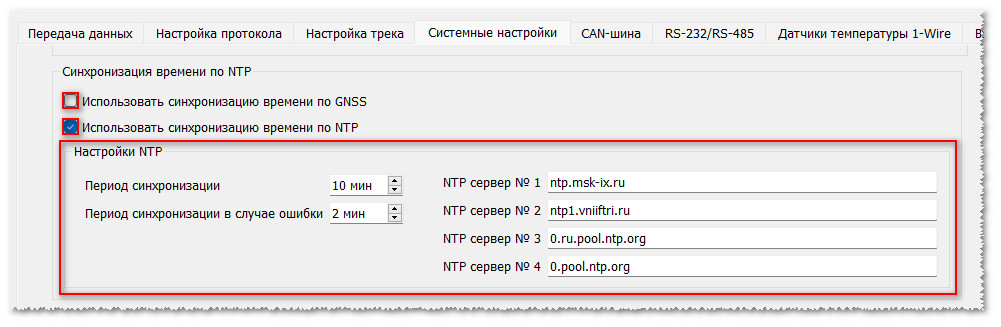
*!EDITS SYSTEM:NTP(1,10,2,ntp.msk-ix.ru,ntp1.vniiftri.ru,0.ru.pool.ntp.org,0.pool.ntp.org),TIME(,,0)
Descriptions of the configuration parameters are available here:
¶ Additional Information
¶ Manual Time Adjustment
If the NTP servers are unavailable or there are Internet connectivity issues, the device time can be adjusted manually using the SETTIME command.
The command can be sent through any available communication channel (SMS, USB, Internet, Bluetooth).
Examples:
*!SETTIME +3600 – increases the current device time by one hour (3600 seconds);
*!SETTIME -600 – decreases the current device time by ten minutes (600 seconds).