¶ Registration
Register in the DRC system and obtain your Account ID. The registration process is described in detail in the Registration Guide.
¶ Device Setup
Configure your device to work with the DRC service. You can do this using any of the following methods:
Commands sent over the Internet do not require a password.
*!EDITS TRANS:DRC(1,,id)
idis the Account ID assigned during registration. The value shown here is only an example.
If SMS control password is not configured:
*!EDITS TRANS:DRC(1,,id)
If an SMS control password is configured, for example 1234:
1234 *!EDITS TRANS:DRC(1,,id)
idis the Account ID assigned during registration. The value shown here is only an example.
Open the Data Transmission tab and configure the following parameters:
- Automatic connection to DRC service →
On - Account ID →
id
idis the Account ID assigned during registration. The value shown here is only an example.

Connection Period and Transport Layer Protocol can be left unchanged.
¶ DRC Setup
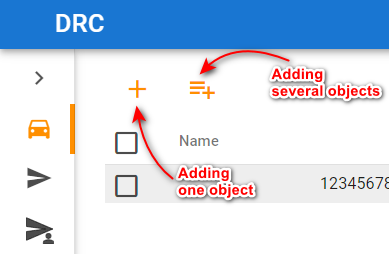
Open the Objects section and add your devices.