¶ Overview
When operating under electronic warfare interference, it is recommended to disable GNSS time synchronization and leave only NTP synchronization enabled. This will prevent an incorrect time from being assigned to a device message.
Time synchronization via NTP is possible only when an Internet-connection is available
¶ Device Preparation
The device firmware release date must be later than 28.05.2024
➜ To request the version use the command: *?V how to send a command?
➜ If necessary update the device firmware: firmware list
¶ Configuration
NTP Configuration options for GLONASS JSC differ depending on your device configuration. Carefully check your Data Transmission settings and select the appropriate option.
¶ Configuration 1. "Recommended"
To work with multiple servers and use remote Configuration one GLONASS JSC SIM-card is sufficient.
Not available for S-242x devices.
 Complete Configuration №1 setup article
How to Check the Configuration
¶ Using a Command
Request: *!READ TRANS:AP1,APS,SIMPRIOR,SRV1
Response: TRANS:AP1(internet,,),APS(era,,),SIMPRIOR(1,600,2,0),SRV1(FLEX,1,0,10.77.60.254,30132,TCP)
(important parameters are highlighted in blue and yellow)
¶ In the Configurator
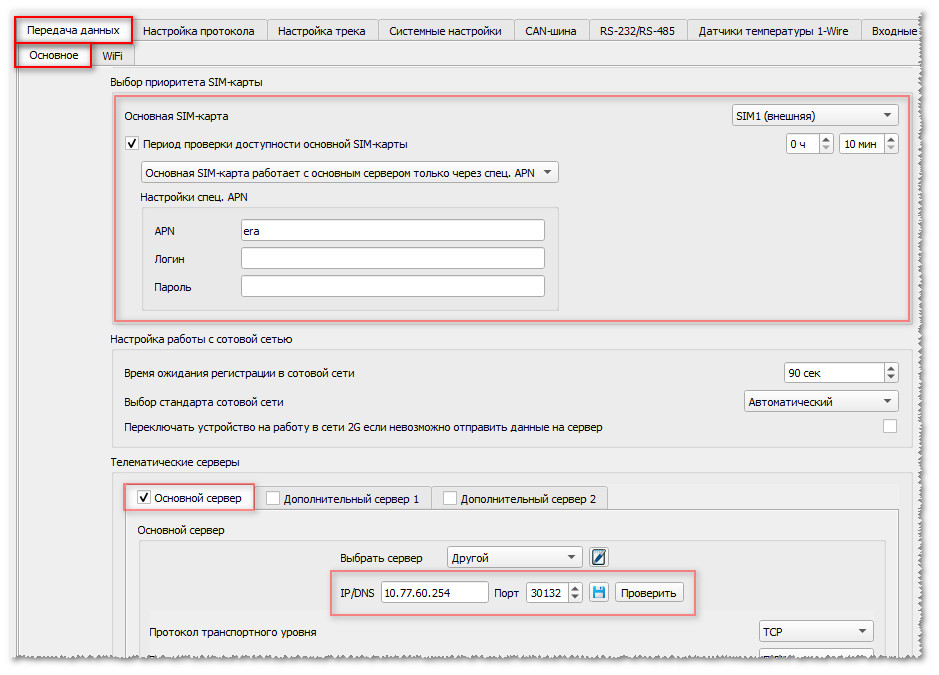
¶ NTP Configuration for Configuration 1
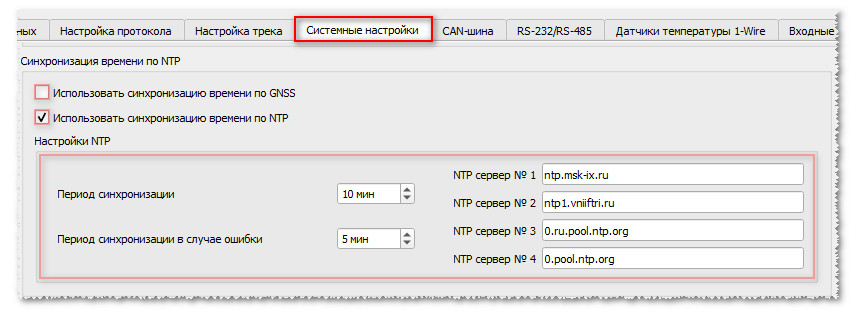
¶ Command for Configuration 1
*!EDITS SYSTEM:NTP(1,10,5,ntp.msk-ix.ru,ntp1.vniiftri.ru,0.ru.pool.ntp.org,0.pool.ntp.org),TIME(,,0)
¶ Configuration 2. "Additional"
To work with multiple servers and use remote Configuration TWO SIM-cards must be installed (a GLONASS JSC SIM-card and a standard SIM-card).
Available only for devices with 2 SIM cards.
Complete Configuration №2 setup article
How to Check the Configuration
¶ Using a Command
Request: *!READ TRANS:AP1,APS,SIMPRIOR,SRV1
Response: TRANS:AP1(internet,,),APS(era,,),SIMPRIOR(1,600,1,0),SRV1(FLEX,1,0,10.77.60.254,30132,TCP)
(important parameters are highlighted in blue and yellow)
¶ In the Configurator
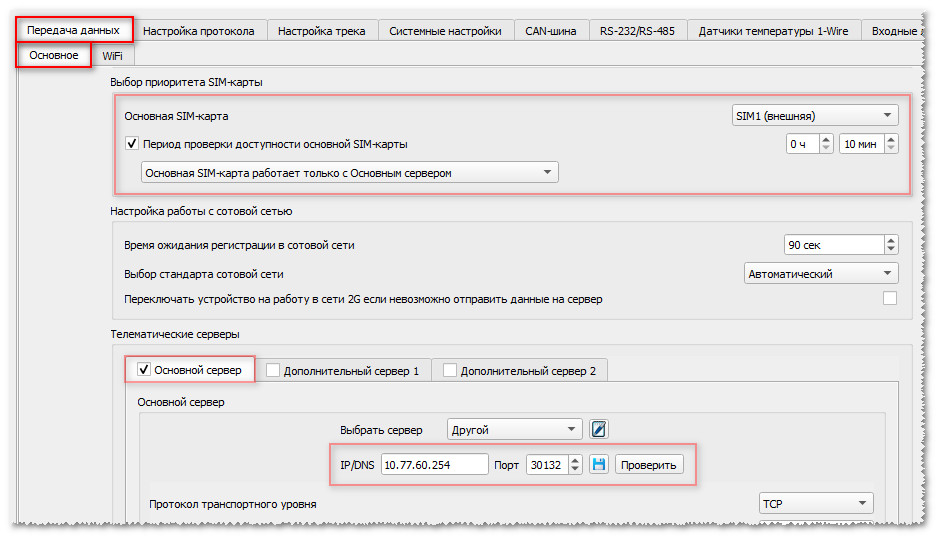
¶ NTP Configuration for Configuration 2
¶ Command for Configuration 2
*!EDITS SYSTEM:NTP(1,10,5,ntp.msk-ix.ru,ntp1.vniiftri.ru,0.ru.pool.ntp.org,0.pool.ntp.org),TIME(,,0)
¶ Configuration 3. "Simplified"
Only one GLONASS JSC SIM-card is used.
Working with multiple servers and remote Configuration are not available!
Available for all devices.
Complete Configuration №3 setup article
How to Check the Configuration
¶ Using a Command
Request: *!READ TRANS:AP1,APS,SIMPRIOR,SRV1
Response: TRANS:AP1(internet,,),APS(era,,),SIMPRIOR(1,600,0,0),SRV1(FLEX,1,0,10.77.60.254,30132,TCP)
(important parameters are highlighted in blue and yellow)
¶ In the Configurator
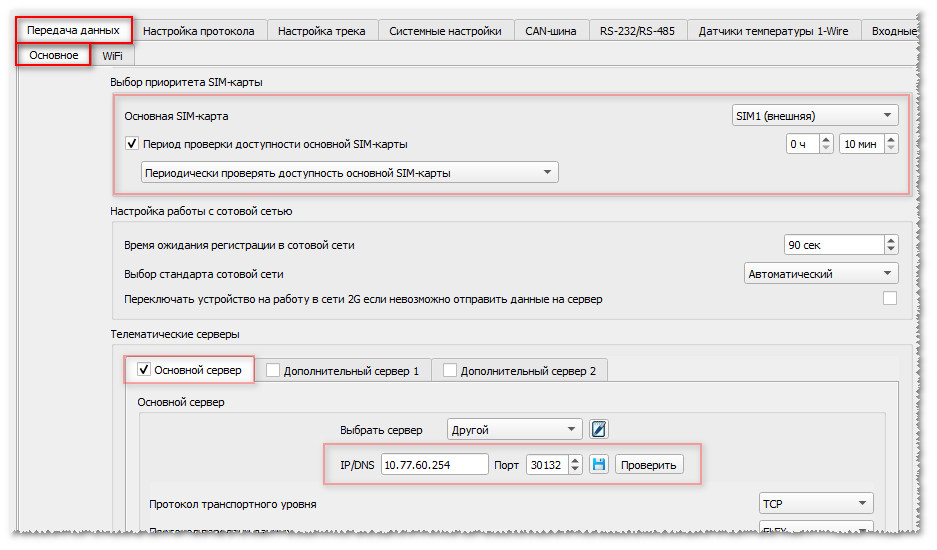
¶ NTP Configuration for Configuration 3
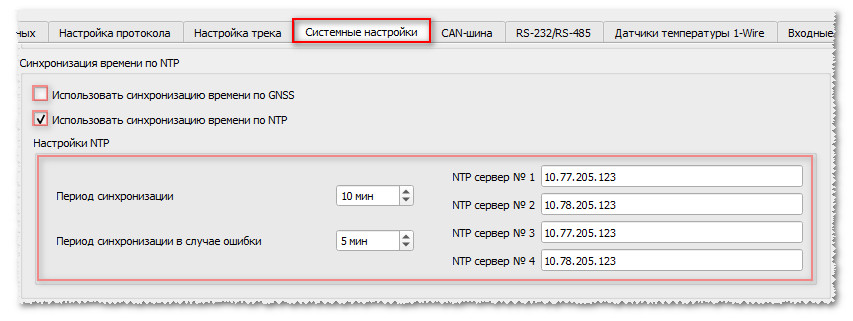
¶ Command for Configuration 3
*!EDITS SYSTEM:NTP(1,10,5,10.77.205.123,10.78.205.123,10.77.205.123,10.78.205.123),TIME(,,0)
¶ Additional Information
¶ NTP Settings Overview
The command applies settings, which are described at the following links:
¶ Manual Time Adjustment
If the time servers are unavailable or there are Internet-connection issues, you can manually adjust the time using the SETTIME command.
The command can be sent via any available communication channel (SMS, USB, Internet, Bluetooth).
Command examples:
*!SETTIME +3600 – this command allows you to increase the current device time by one hour (3600 seconds);
*!SETTIME -600 – this command allows you to decrease the current device time by ten minutes (600 seconds).