¶ Important Notes
There are several Configuration methods when working with the GLONASS JSC server:
A brief overview of each Configuration method:
-
 Recommended
To work with multiple servers and use remote Configuration one GLONASS JSC SIM-card is sufficient.
Not available for S-242x devices. -
 Additional
To work with multiple servers and use remote Configuration TWO SIM-cards must be installed (a GLONASS JSC SIM-card and a standard SIM-card).
Available only for devices with 2 SIM cards. -
 Simplified
Only one GLONASS JSC SIM-card is used.
Working with multiple servers and remote Configuration are not available!
Available for all devices.
Old instructions for connecting to GLONASS JSC: Connecting to GLONASS JSC (old method)
¶ Recommended Method
The settings described below work with firmware dated xx.06.2024 and later
Firmware List
¶ Configuration
For the Configuration below to work correctly the GLONASS JSC SIM-card must be installed in the external slot.
¶ Configuration via Command
 General Rules for Sending Commands
*!EDITS TRANS:AP1(internet,!,!),APS(era,!,!),SIMPRIOR(1,600,2,0),SRV1(FLEX,,,10.77.60.254,30132,TCP),RULES(,,1,90),SIM1RULES(1,1),ROAM(,,300),DRC(1),PROTOCOL:FLEX(30),SYSTEM:NTP(1,10,5,ntp.msk-ix.ru,ntp1.vniiftri.ru,0.ru.pool.ntp.org,0.pool.ntp.org),TIME(,,0)
¶ Configuration via the Configurator


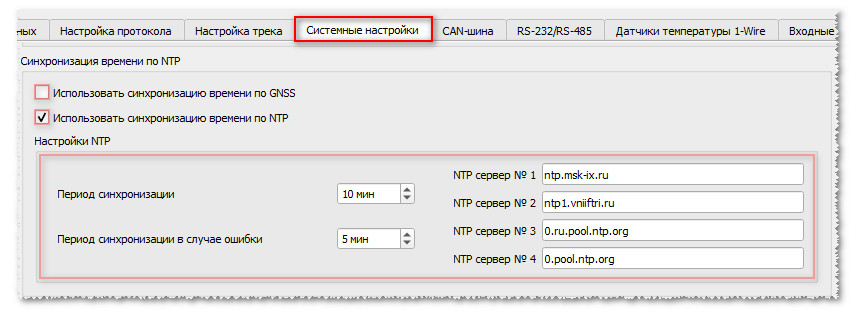
¶ Configuration via Command
General Rules for Sending Commands
*!EDITS TRANS:AP1(internet,!,!),APS(era,!,!),SIMPRIOR(1,600,2,0),SRV1(FLEX,,,10.77.60.254,30132,TCP),RULES(,,1,90),ROAMSIM1(0),ROAM(,,300),DRC(1),PROTOCOL:FLEX(30),SYSTEM:NTP(1,10,5,ntp.msk-ix.ru,ntp1.vniiftri.ru,0.ru.pool.ntp.org,0.pool.ntp.org),TIME(,,0)
¶ Configuration via the Configurator

¶ Operation Algorithm
-
The device operates only through the "main" SIM-card.
-
At the beginning of the algorithm the device sets the "spec. APN" and connects only to the "Main Server" and works with it for the time, set by the timer.
-
When the timer expires the device automatically switches to the "public APN" for the "main" SIM-card, connects to NTP-servers, DRC, and establishes connections with additional servers.
After the archive upload is complete or the timer expires (whichever occurs first) the device sets the "spec. APN" again to work with the "Main Server". It then continues working until the timer expires again. -
Additionally. When a command is received to connect to RCS or DRC the device switches to the "public APN", connects to the service servers and after the communication session with them is complete sets the "spec. APN" again to work with the "Main Server".
While working with the service servers the device can adjust the time via NTP-servers, and also work with additional servers from the Configuration.